

Languages
In Colophon a translation is an entry of its own: its own fields, drafts, history and publishing. The versions of one piece of content in different languages are joined in a group, so you can move between them. This page is for writers and translators.
Give an entry its language
Section titled “Give an entry its language”Every entry has a Locale in its side panel: Which language this entry is written in, like en or pt-BR. Empty is the project’s default.
-
Open the entry. Under Locale, type a language tag:
en,fr,pt-BR. -
It is saved with the entry, like any change.
A tag is a language code of 2 or 3 letters, optionally followed by a region or script, such as pt-BR
or zh-Hant, up to 35 characters. The content type’s list shows the tag beside each entry’s title.
Add a version in another language
Section titled “Add a version in another language”-
Open the entry you translate from. It needs a locale of its own first; without one, Colophon says Give this entry a locale before adding versions.
-
Under Versions, type the new language’s tag in the small box (it suggests
fr) and press Add version. -
Colophon copies the entry’s current draft into a new entry in that language, says Added the fr version., and opens it. Translate its fields: they start as a copy of the original.
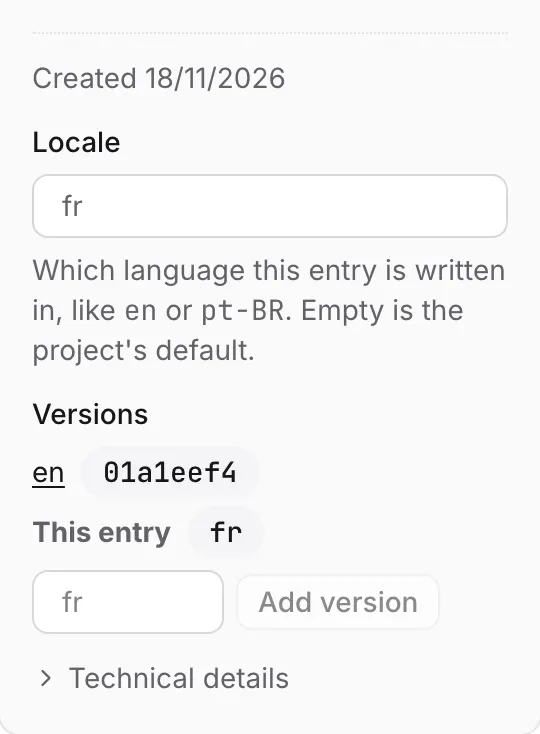
Versions lists every entry in the group. The one you are in is This entry; the others are links, named by their language (default for one without a tag), that open their own editors.
- A group holds one entry per language. Adding a language it already has is refused: A version in that locale already exists.
- An entry in a group always keeps a locale. You can change it to another tag, but not clear it.
- A URL name field is copied with the language added (
lemon-tart-fr), so the versions never share an address.
Each version is published on its own
Section titled “Each version is published on its own”Because each version is an entry, everything else works per version:
- it has its own History, Comments and status (Draft, Live, Live with changes);
- it is published, scheduled, taken down and rolled back on its own, in its own publish request or together with others in one;
- publishing the English version doesn’t publish the French one, and taking one down leaves the others live.
To release several languages at once, put the versions in one publish request: see Publishing and review.
What your website gets
Section titled “What your website gets”The delivery API doesn’t choose between languages yet. Its rows carry no locale, and there is no
?locale= or fallback from one language to another. A site reads each version by its id, or filters on
a field of its own that holds the language: see Languages in the delivery
API.
Choosing a language when reading, with fallbacks set as an explicit project setting, is Planned.
Was this page helpful?
Either answer opens a short issue on GitHub, so you can say what worked or what was missing.
Colophon home · the product, its blog and how to try it.